Three new Asha smartphones join the next generation family with the launch of the Nokia Asha 500, 502 and 503. In this post we are focusing on 502A new hardware design combines two finely-crafted layers of polycarbonate: a vibrantly coloured core, beneath a strong transparent layer. The combination captures and reflects light and colour beautifully, without adding to the size or weight. Swipe. Snap. Share.
Take and upload photos super-quickly. Just
swipe from your lock screen to the camera, and you’re ready to start
snapping. Sharing the fun is easy, too – you can upload your pictures to
Facebook with just one touch.
The difference is crystal clearWith a bold-coloured core encased in a crystal-clear shell, the Asha 502 Dual SIM stands out with its unique design.One swipe to even more of what you loveFastlane collects all of your recent apps, contacts, Facebook updates, tweets, and what’s next in your calendar onto a single screen. It even shows you the likes and comments on your Facebook photos and posts. Smarter surfing. Less data.
Love surfing the web? With the Nokia Xpress
Browser, you’ll browse faster while saving on data. And with the Nokia
Xpress Now app, you can discover new, trending content from across the
internet.
Click on below image to get detailed specifications for the Nokia Asha 502 Dual SIM Phone |

Friday, January 3, 2014
Nokia Asha 502 Dual SIM Phone

Sunday, November 17, 2013
Simple Steps to Integrate Instagram with Facebook Page
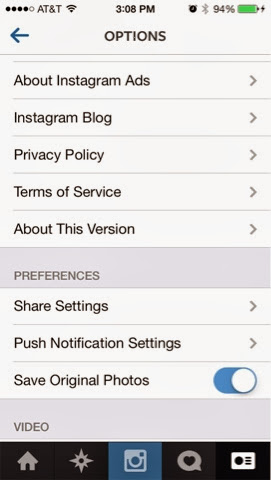
Here's how:
- Open the Instagram app.
- Tap on the Profile icon. It is the one to the far right.
- Now tap on the Settings icon in the upper right hand corner.
- Under Preferences tap on Share Settings.
- Now tap on Facebook.

-
Under Facebook option, tap on Share to which is defaulted to personal facebook timeline.
- Instagram should now route you to Facebook where you'll get a message asking if you give Instagram consent to manage your pages. Tap Ok.
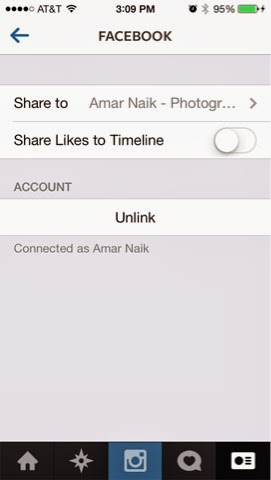
You'll now be routed back to Instagram where a whole list of
all the pages you administer will be there. Just tap and select the page you
would like your Instagram photos to automatically be posted to.

That's all. A simple and effective way to manage sharing
between two apps. If you ever want to modify the way Instagram publishes
photos, you can always do so by performing the same steps above again.
Monday, November 4, 2013
Nokia Lumia 1020: Nothing Else Comes Close
Unbeatable photos and video
The only smartphone with a 41 megapixel camera sensor, 11.43 cm display size, Full HD video and Nokia Rich Recording for incredible audio capture.
Nokia Pro Cam
Capture high resolution photos, zoom into details and reframe them as new images. Adjust focus, white balance and exposure with easy, intuitive controls.

Your moments captured like never before.
The Nokia Lumia 1020 takes photos and videos
that no other smartphone can match with a 41 megapixel camera sensor,
PureView technology, Optical Image Stabilisation and amazing
high-resolution zoom.
Zoom. Reinvented.
Nokia Pro Cam on the Nokia Lumia 1020 lets
you shoot in super high resolution, which means you can zoom in close to
your shot after you’ve taken it. Then rotate, reframe, crop and share
new images as many times as you want.
Take photos like a pro.
Capturing stunning images is easier than ever
with Nokia Pro Cam. Take your photos to a new level by adjusting focus,
shutter speed, white balance and more with easy and intuitive controls.
Subscribe to:
Posts (Atom)